


eSIM Philippines pour touristes et expatriés | Données mobiles instantanées
eSIM pour les Philippines : une connectivité instantanée à travers les îles
Explorez les Philippines avec des données mobiles fiables grâce à notre solution eSIM , idéale pour les voyageurs, les nomades numériques et les expatriés. Oubliez les tracas des cartes SIM locales : activez votre forfait en quelques minutes et profitez d'un internet 4G/LTE fluide dans tout l'archipel.
📱
Caractéristiques principales :
-
Activation instantanée : recevez votre code QR par e-mail et connectez-vous en quelques minutes, aucune carte SIM physique requise.
-
4G/LTE haut débit : profitez d'une couverture réseau forte et rapide dans les villes et les points chauds touristiques comme Manille, Cebu, Boracay et Palawan.
-
Pas de frais d'itinérance : évitez les frais surprises en utilisant des forfaits de données eSIM locaux.
-
Écologique : Adoptez une carte SIM numérique qui réduit les déchets plastiques.
-
Forfaits flexibles : choisissez le forfait de données adapté aux courts séjours, aux vacances ou à une utilisation à long terme.
-
Compatible double SIM : conservez votre numéro existant tout en utilisant notre eSIM pour les données.
🧭
Pourquoi choisir notre eSIM pour les Philippines ?
Des plages de Siargao aux collines de Baguio, notre eSIM vous assure une connexion permanente. Partagez instantanément des moments, utilisez Google Maps, réservez des trajets ou consultez vos e-mails où que vous soyez, sans avoir à chercher le Wi-Fi.
🛠
Comment ça marche :
-
Achetez votre forfait de données eSIM en ligne.
-
Recevez le QR code instantanément par email.
-
Scannez le code QR dans les paramètres de votre appareil.
-
Activez vos données et profitez d'un Internet ininterrompu.
✅
Appareils compatibles :
Nos eSIM fonctionnent avec la plupart des téléphones et tablettes compatibles eSIM, notamment :
-
iPhone XS ou plus récent (iOS 12.1+)
-
Samsung Galaxy S20 et supérieur
-
Google Pixel 3 ou plus récent
-
Autres appareils Android compatibles eSIM
📌 Assurez-vous que votre appareil prend en charge l'eSIM avant l'achat.
Why choose Travel eSIM
Immediate Activation
Start using your eSIM immediately upon purchase—no delays, simply scan the QR code to connect.
High Speed Data
Experience speedy, trustworthy data with leading speeds, leveraging multiple network providers for optimal coverage.
Compatibility
Compatible with various eSIM-ready devices, such as smartphones and tablets.

Cost Effective
Economical data plans providing cost savings compared to traditional roaming services or local SIM cards.
Features for Travel eSIM

Unlimited Data
Keep in touch wherever your journey takes you with the Unlimited Data feature, ensuring you have a continuous flow of data when you purchase the Unlimited Data Product.

Keep Your Existing SIM
You can keep your current number and use WhatsApp on your existing SIM card while benefiting from our eTravelsim product.

Save on Roaming
Reduce costly international roaming fees while maintaining reliable connectivity. Effortlessly transition between local networks for cost-effective and convenient communication during your travels.

Easy to Buy
Effortless online purchase, immediate activation, and no waiting for physical SIM cards. Enhance connectivity on your travels with ease, streamlining your journey.

No Documentation
Activate your eSIM efficiently using ESimAllo - no documentation needed. Experience a smooth activation process without extra paperwork.

Call Minutes
Choose the call option to connect locally via voice with eTravelsim. Experience the ease of making local calls from any location for seamless communication while traveling.
Security over Public Wifi
ESIM technology ensures top-tier security using cellular networks, strong encryption protocols, and reliable authentication methods.
How to install Travel eSIM in iPhone ?
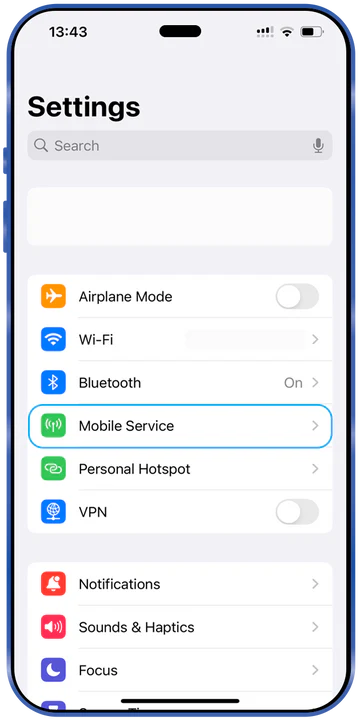
Look for Mobile Service
Access your iPhone's settings and locate the 'Mobile Service' option for managing connections
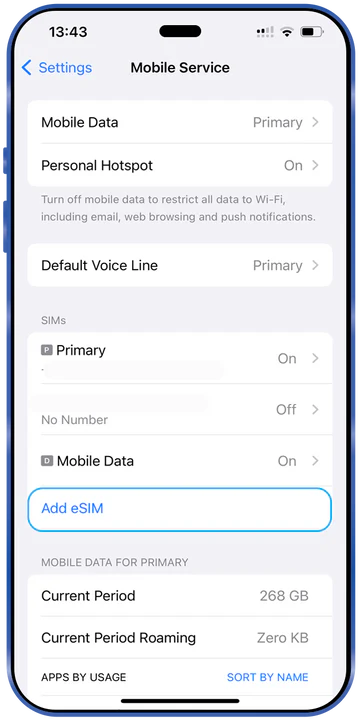
Go to Add eSIM
Choose 'Add eSIM' to initiate the setup of a new eSIM profile
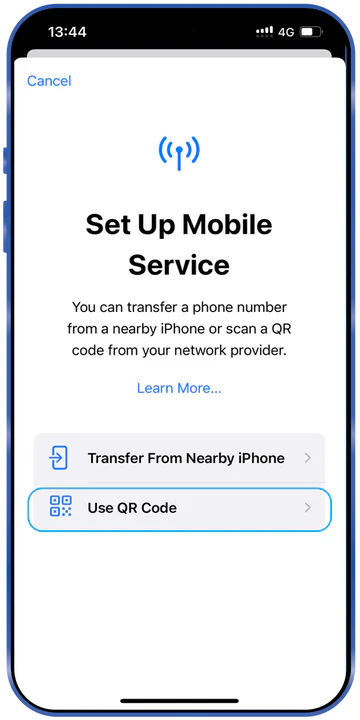
Find QR Code
Secure the QR code issued by ESimAllo for activation
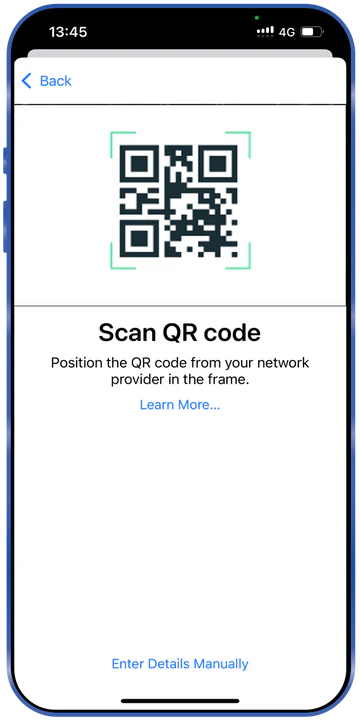
Scan QR code
Scan the QR code with your iPhone camera to automatically set up the eSIM
How to Install eSIM in Android phone?
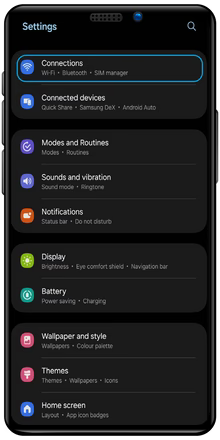
Settings
Use the Settings app to find 'Connections' for controlling your network choices
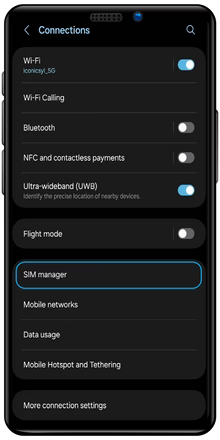
Connections
Locate and choose 'SIM Manager' in the 'Connections' menu.
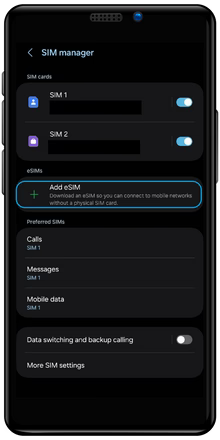
SIM Manager
Select 'Add eSIM' to initiate the eSIM setup process
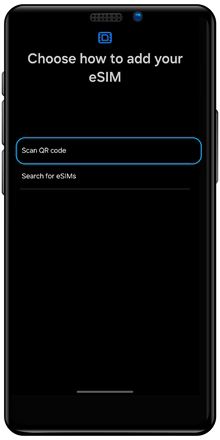
Add eSIM
Scan the given QR code to set up and activate your eSIM
Important FAQ

How does ESimAllo for Europe work?
Upon purchasing an ESimAllo product, customers will get a unique QR code via email. This code is sent to the registered email ID used during the purchase. The email will include detailed instructions on product installation. To start using the product, scan the QR code.

How will I get the QR code for my purchase?
Upon booking the eSIM, you will promptly receive the QR code to your registered email ID. This will include instructions for installing the QR code, SMDP address, and activation code. Upon installation of the QR code, you are all set.

How ESimAllo eSIMs Benefit Nomads?
ESimAllo offers various eSIM plans customized for digital nomads and frequent travelers. The eSIM solutions deliver dependable and cost-effective connectivity for your journeys. Activation is simple online, and the plans are flexible, making staying connected hassle-free.
You may check from the list of compatible handsets for Travel eSIM for Europe

Apple
iPhone 16, iPhone 16 Plus, iPhone 16 Pro, iPhone 16 Pro Max, iPhone 15, iPhone 15 Plus, iPhone 15 Pro, iPhone 15 Pro Max, iPhone 14, iPhone 14 Plus, iPhone 14 Pro, iPhone 14 Pro Max, iPhone 13, iPhone 13 mini, iPhone 13 Pro, iPhone 13 Pro Max, iPhone 12, iPhone 12 mini, iPhone 12 Pro, iPhone 12 Pro Max, iPhone 11 Dual SIM (nano-SIM and eSIM), iPhone 11 Pro, iPhone 11 Pro Max, iPhone XR, iPhone XS, iPhone XS Max, iPhone SE (2020)
Note: iPhone 11 is not compatible with existing micro-SIM cards.

Android
Gemini PDA, Google Pixel 5, Google Pixel 2, Google Pixel 2XL, Google Pixel 3, Google Pixel 3 XL, Google Pixel 3a, Google Pixel 3a XL, Google Pixel 4, Google Pixel 4 XL, Google Pixel 4a, Google Pixel 4a5G, Huawei P40, Huawei P40 Pro, Motorola Razr 2019 Palm, Samsung Galaxy Fold, Samsung Galaxy Note20, Samsung Galaxy Note20 5G, Samsung Galaxy Note20 Ultra, Samsung Galaxy Note20 Ultra 5G, Samsung Galaxy S20Samsung Galaxy S20 5G, Samsung Galaxy S20 Ultra, Samsung Galaxy S20 Ultra 5G, Samsung Galaxy S20+, Samsung Galaxy S20+ 5G, Samsung Galaxy Z Flip, Samsung Galaxy Z Flip 5G