


eSIM Australia for Tourists & Travelers | Instant Mobile Data
Couldn't load pickup availability
Description
eSIM Australia for Tourists & Travelers | Instant Mobile Data
Short intro (top of page)
Stay connected across Australia with a fast travel eSIM. No physical SIM card needed — just prepaid mobile data with quick QR installation, perfect for trips, road travel, and business visits.
Key benefits
-
Instant QR Setup: install your eSIM in minutes
-
No Physical SIM Needed: keep your main SIM active
-
Reliable Coverage in Australia: great for cities and everyday travel use
-
Prepaid Plans: no contract, no hidden fees
-
Works on iPhone & Android: eSIM-compatible + unlocked devices
-
Eco-Friendly: digital SIM = less plastic waste
How it works (3 steps)
-
Choose your Australia plan and purchase
-
Receive your eSIM QR code (plus manual install details if needed)
-
Scan → Install → Turn on Mobile Data (Data Roaming may be required)
What you can do with your eSIM
-
Maps & navigation (city + road trips)
-
Messaging & social apps
-
Ride-hailing, bookings, travel apps
-
Email and work on the go
Compatibility
Works with unlocked, eSIM-compatible devices.
Tip: Settings → Cellular/Mobile Data → Add eSIM / Add Cellular Plan.
Important notes
-
Most travel eSIMs are data-only (calls/SMS only if stated on the plan)
-
Activation usually starts when the eSIM connects to a supported network in Australia (plan/provider dependent)
-
QR codes are typically single-use (one device)
FAQ (SEO)
Is my phone compatible?
If it’s unlocked and supports eSIM, yes. Check your device settings or model list.
When does the plan start?
Usually when it first connects in Australia, or when enabled (depends on the plan).
Do I need Wi-Fi to install it?
Yes, Wi-Fi is recommended for a smooth installation.
Do I need Data Roaming ON?
Often yes for travel eSIMs. Enable it only for the eSIM line.
Can I keep my WhatsApp number?
Yes. Keep WhatsApp on your main number and use the eSIM for data.
Why choose ESimAllo
Immediate Activation
Start using your eSIM immediately upon purchase—no delays, simply scan the QR code to connect.
High Speed Data
Experience speedy, trustworthy data with leading speeds, leveraging multiple network providers for optimal coverage.
Compatibility
Compatible with various eSIM-ready devices, such as smartphones and tablets.

Cost Effective
Economical data plans providing cost savings compared to traditional roaming services or local SIM cards.
Features for Travel eSIM

Unlimited Data
Keep in touch wherever your journey takes you with the Unlimited Data feature, ensuring you have a continuous flow of data when you purchase the Unlimited Data Product.

Keep Your Existing SIM
You can keep your current number and use WhatsApp on your existing SIM card while benefiting from our eTravelsim product.

Save on Roaming
Reduce costly international roaming fees while maintaining reliable connectivity. Effortlessly transition between local networks for cost-effective and convenient communication during your travels.

Easy to Buy
Effortless online purchase, immediate activation, and no waiting for physical SIM cards. Enhance connectivity on your travels with ease, streamlining your journey.
No Documentation
Activate your eSIM efficiently using ESimAllo - no documentation needed. Experience a smooth activation process without extra paperwork.

Security over Public Wifi
ESIM technology ensures top-tier security using cellular networks, strong encryption protocols, and reliable authentication methods.
How to install Travel eSIM in iPhone ?
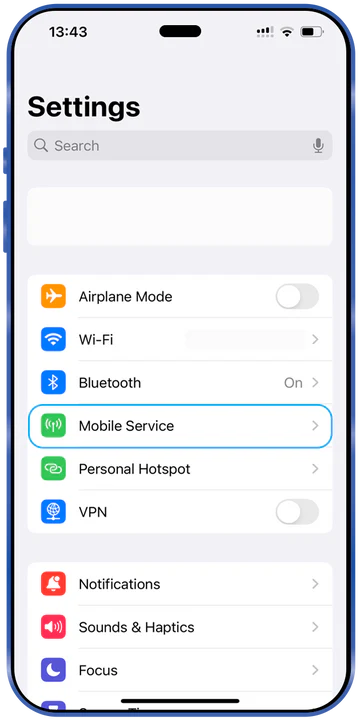
Look for Mobile Service
Access your iPhone's settings and locate the 'Mobile Service' option for managing connections
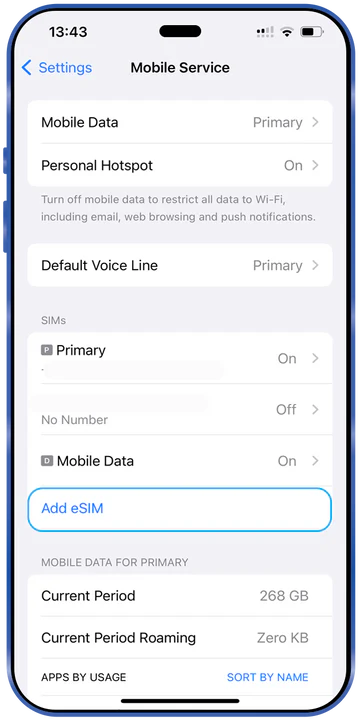
Go to Add eSIM
Choose 'Add eSIM' to initiate the setup of a new eSIM profile
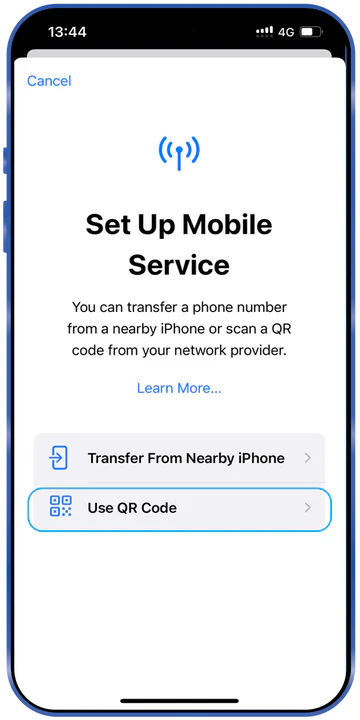
Find QR Code
Secure the QR code issued by ESimAllo for activation
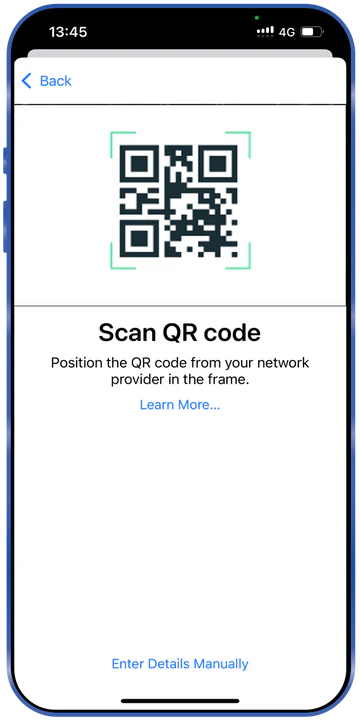
Scan QR code
Scan the QR code with your iPhone camera to automatically set up the eSIM
How to Install eSIM in Android phone?
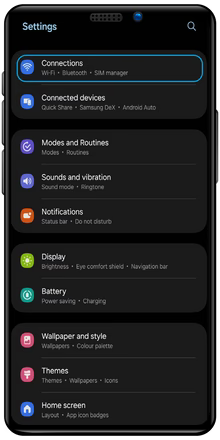
Settings
Use the Settings app to find 'Connections' for controlling your network choices
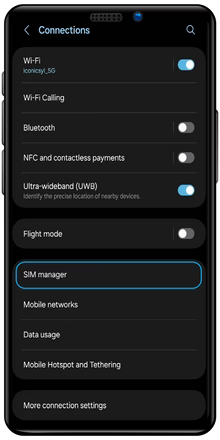
Connections
Locate and choose 'SIM Manager' in the 'Connections' menu.
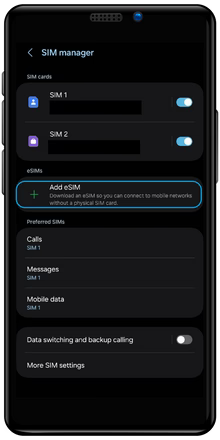
SIM Manager
Select 'Add eSIM' to initiate the eSIM setup process
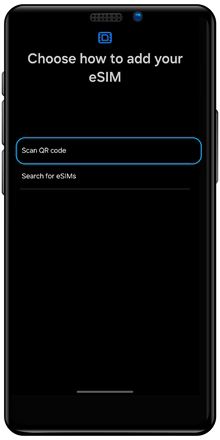
Add eSIM
Scan the given QR code to set up and activate your eSIM
Important FAQ

How does ESimAllo for Europe work?
Upon purchasing an ESimAllo product, customers will get a unique QR code via email. This code is sent to the registered email ID used during the purchase. The email will include detailed instructions on product installation. To start using the product, scan the QR code.

How will I get the QR code for my purchase?
Upon booking the eSIM, you will promptly receive the QR code to your registered email ID. This will include instructions for installing the QR code, SMDP address, and activation code. Upon installation of the QR code, you are all set.

How ESimAllo eSIMs Benefit Nomads?
ESimAllo offers various eSIM plans customized for digital nomads and frequent travelers. The eSIM solutions deliver dependable and cost-effective connectivity for your journeys. Activation is simple online, and the plans are flexible, making staying connected hassle-free.
You may check from the list of compatible handsets for Travel eSIM for Europe

Apple
iPhone 16, iPhone 16 Plus, iPhone 16 Pro, iPhone 16 Pro Max, iPhone 15, iPhone 15 Plus, iPhone 15 Pro, iPhone 15 Pro Max, iPhone 14, iPhone 14 Plus, iPhone 14 Pro, iPhone 14 Pro Max, iPhone 13, iPhone 13 mini, iPhone 13 Pro, iPhone 13 Pro Max, iPhone 12, iPhone 12 mini, iPhone 12 Pro, iPhone 12 Pro Max, iPhone 11 Dual SIM (nano-SIM and eSIM), iPhone 11 Pro, iPhone 11 Pro Max, iPhone XR, iPhone XS, iPhone XS Max, iPhone SE (2020)
Note: iPhone 11 is not compatible with existing micro-SIM cards.

Android
Gemini PDA, Google Pixel 5, Google Pixel 2, Google Pixel 2XL, Google Pixel 3, Google Pixel 3 XL, Google Pixel 3a, Google Pixel 3a XL, Google Pixel 4, Google Pixel 4 XL, Google Pixel 4a, Google Pixel 4a5G, Huawei P40, Huawei P40 Pro, Motorola Razr 2019 Palm, Samsung Galaxy Fold, Samsung Galaxy Note20, Samsung Galaxy Note20 5G, Samsung Galaxy Note20 Ultra, Samsung Galaxy Note20 Ultra 5G, Samsung Galaxy S20Samsung Galaxy S20 5G, Samsung Galaxy S20 Ultra, Samsung Galaxy S20 Ultra 5G, Samsung Galaxy S20+, Samsung Galaxy S20+ 5G, Samsung Galaxy Z Flip, Samsung Galaxy Z Flip 5G